Salesforce Prompt Templates are a powerful feature for generating text and JSON using AI. However, automatically creating or updating Salesforce records (such as Opportunities, Tasks, and Contacts) based on that output has traditionally required complex Apex code.
In this article, we introduce how to create Salesforce records from AI-generated JSON output without writing any code, by using the Declarative Record Builder built on the GenericOrchestrationFramework.
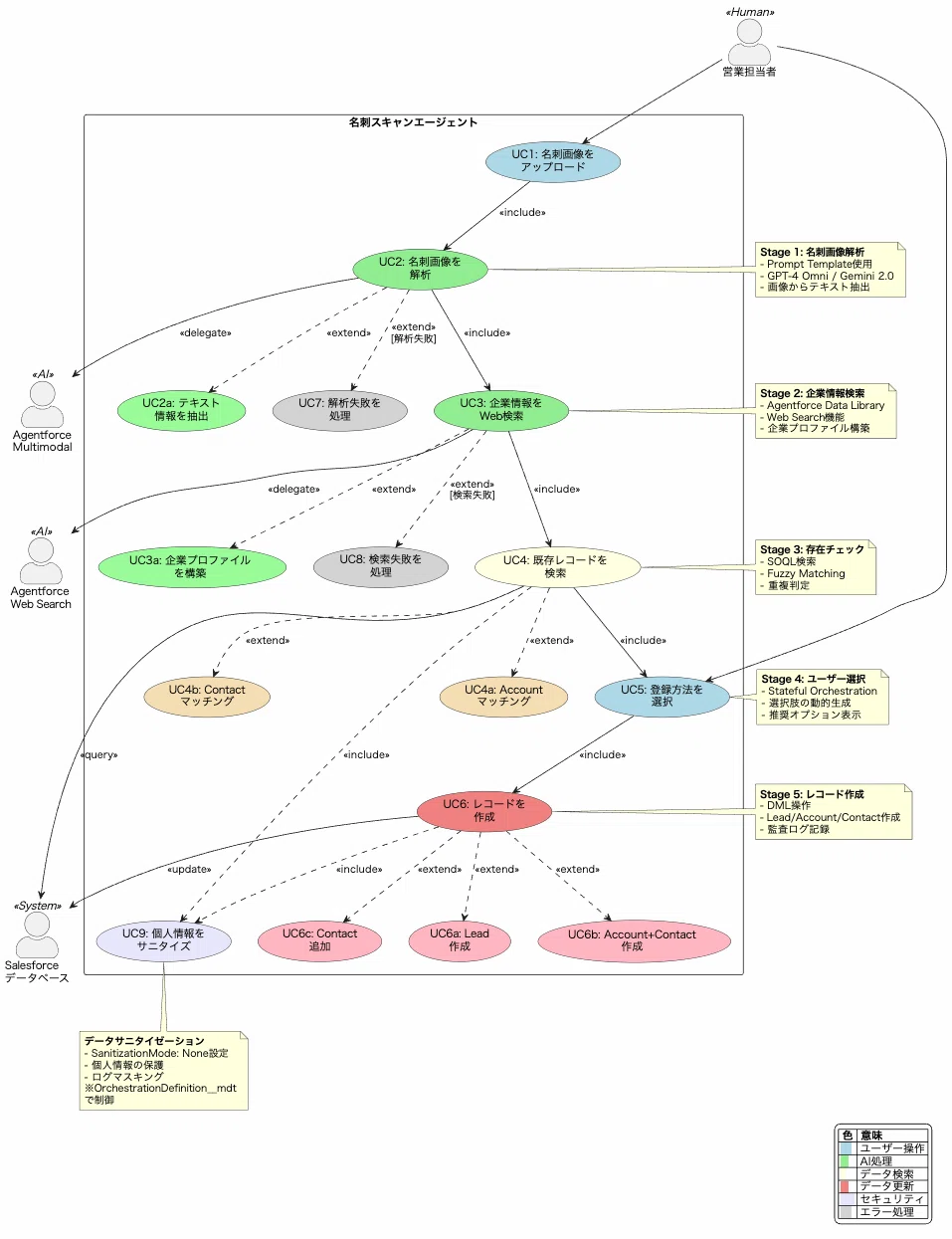
| Aspect | Traditional Approach | Declarative Record Builder |
|---|---|---|
| Implementation | Create new Apex for each AI output | Configuration only via Custom Metadata |
| Handling changes | Code change + deployment | Metadata change only |
| Reusability | Low (per use case) | High (just change the configuration) |
| Maintenance cost | High | Low |
| Required skill | Apex required | Admins can configure it |
┌─────────────────────────────────────────────────────────────────────┐
│                    GenericOrchestrationFramework                     │
├─────────────────────────────────────────────────────────────────────┤
│                                                                       │
│  ┌──────────────┐    ┌──────────────┐    ┌──────────────────────┐   │
│  │ Input Source  │───▶│  AI Agent    │───▶│ DeclarativeRecord   │   │
│  │ (e.g. minutes)│    │ (JSON output)│    │     Builder         │   │
│  └──────────────┘    └──────────────┘    └──────────────────────┘   │
│                              │                        │              │
│                              ▼                        ▼              │
│                    ┌──────────────────┐    ┌──────────────────┐     │
│                    │ SchemaMapping    │    │   Salesforce     │     │
│                    │   __mdt          │    │    Records       │     │
│                    │ (JSON schema)    │    │ (Opp/Task/Event) │     │
│                    └──────────────────┘    └──────────────────┘     │
│                                                                       │
└─────────────────────────────────────────────────────────────────────┘
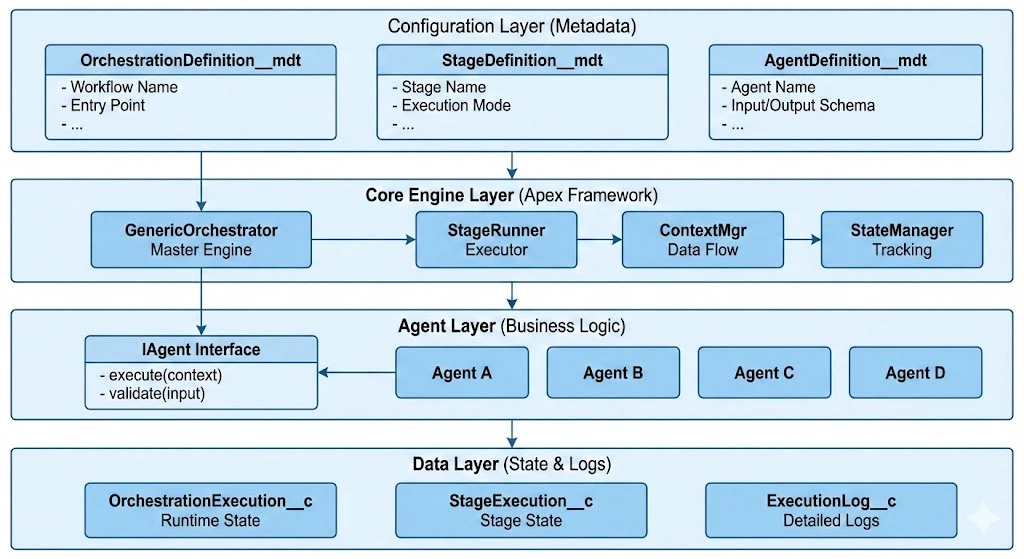
The most important element is SchemaMapping__mdt. This is where you define the JSON schema passed to the AI as well as the extraction rules.
<?xml version="1.0" encoding="UTF-8"?>
<CustomMetadata xmlns="http://soap.sforce.com/2006/04/metadata">
    <label>Meeting Minutes Opportunity</label>
    <protected>false</protected>
    <values>
        <field>RootObjectApiName__c</field>
        <value>Opportunity</value>
    </values>
    <values>
        <field>Description__c</field>
        <value>Extract and create opportunity info, tasks, events, and contacts from meeting minutes</value>
    </values>
    <values>
        <field>IsActive__c</field>
        <value>true</value>
    </values>
    <values>
        <field>Version__c</field>
        <value>3.0</value>
    </values>
    <values>
        <field>JsonSchemaTemplate__c</field>
        <value><!-- JSON schema described later --></value>
    </values>
</CustomMetadata>
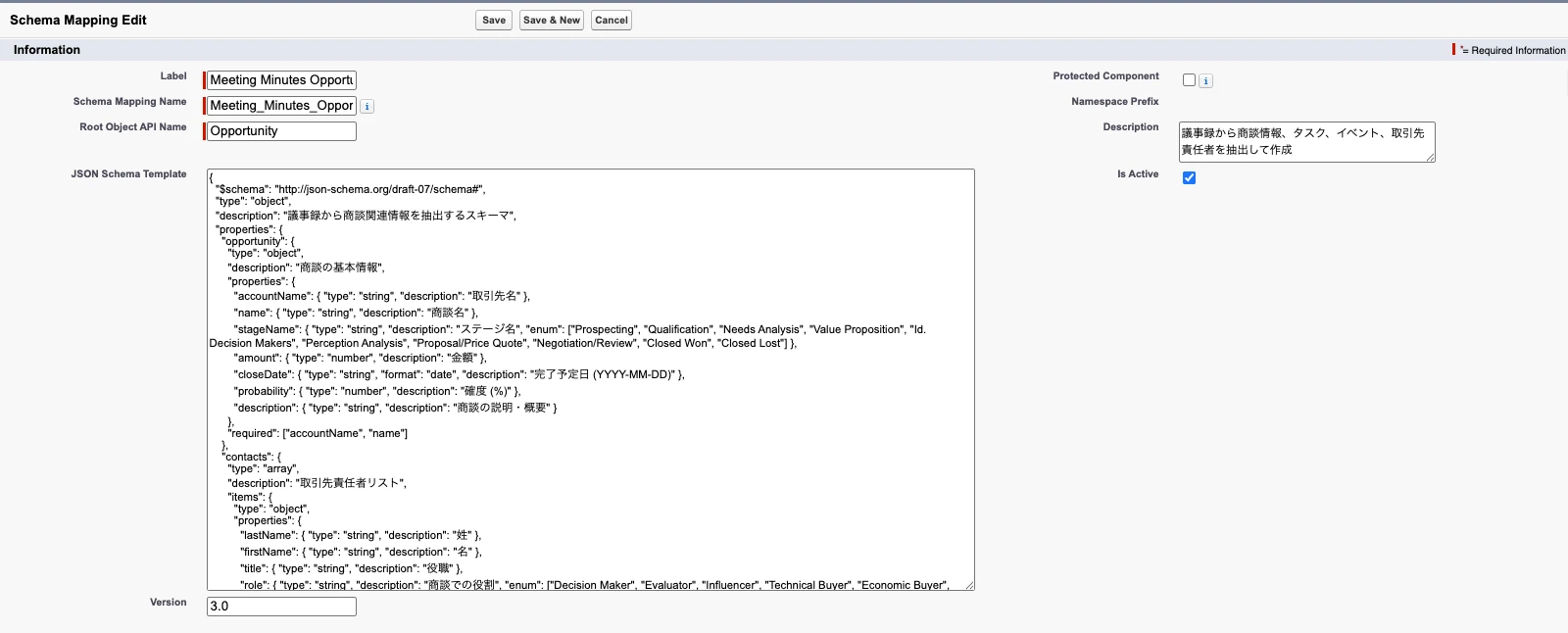
Most important point: The structure of the JSON schema becomes the hierarchy of Salesforce records as-is.
{
  "$schema": "http://json-schema.org/draft-07/schema#",
  "type": "object",
  "description": "Schema to extract opportunity-related information from meeting minutes",
  "properties": {
    "opportunity": {
      "type": "object",
      "description": "Basic opportunity info (root object)",
      "properties": {
        "accountName": {
          "type": "string",
          "description": "Account name - maps to Account.Name"
        },
        "name": {
          "type": "string",
          "description": "Opportunity name - maps to Opportunity.Name"
        },
        "stageName": {
          "type": "string",
          "description": "Stage name",
          "enum": [
            "Prospecting",
            "Qualification",
            "Needs Analysis",
            "Value Proposition",
            "Proposal/Price Quote",
            "Negotiation/Review",
            "Closed Won",
            "Closed Lost"
          ]
        },
        "amount": {
          "type": "number",
          "description": "Amount (numbers only)"
        },
        "closeDate": {
          "type": "string",
          "format": "date",
          "description": "Close date (YYYY-MM-DD)"
        }
      },
      "required": ["accountName", "name"]
    },
    "contacts": {
      "type": "array",
      "description": "List of contacts related to the opportunity",
      "items": {
        "type": "object",
        "properties": {
          "lastName": {
            "type": "string",
            "description": "Last name"
          },
          "firstName": {
            "type": "string",
            "description": "First name"
          },
          "title": {
            "type": "string",
            "description": "Title"
          },
          "role": {
            "type": "string",
            "description": "Role in the opportunity",
            "enum": [
              "Decision Maker",
              "Evaluator",
              "Influencer",
              "Technical Buyer",
              "Economic Buyer"
            ]
          }
        },
        "required": ["lastName"]
      }
    },
    "tasks": {
      "type": "array",
      "description": "List of tasks (related to the opportunity)",
      "maxItems": 10,
      "items": {
        "type": "object",
        "properties": {
          "subject": {
            "type": "string",
            "description": "Subject"
          },
          "description": {
            "type": "string",
            "description": "Details"
          },
          "activityDate": {
            "type": "string",
            "format": "date",
            "description": "Due date"
          },
          "priority": {
            "type": "string",
            "enum": ["High", "Normal", "Low"]
          }
        },
        "required": ["subject"]
      }
    },
    "nextMeeting": {
      "type": "object",
      "description": "Next meeting (Event)",
      "properties": {
        "subject": {
          "type": "string",
          "description": "Subject"
        },
        "startDateTime": {
          "type": "string",
          "format": "date-time"
        },
        "endDateTime": {
          "type": "string",
          "format": "date-time"
        },
        "location": {
          "type": "string",
          "description": "Location"
        }
      }
    },
    "summary": {
      "type": "string",
      "description": "Meeting minutes summary (within 200 characters)"
    }
  },
  "required": ["opportunity", "summary"]
}
JSON Schema Structure                  Salesforce Record Hierarchy
─────────────────                   ─────────────────────────────
{
  "opportunity": {...}      ───▶   Level 1: Opportunity (root)
                                           │
  "contacts": [...]         ───▶   Level 2: ├─ OpportunityContactRole
                                           │     └─ Contact (referenced)
  "tasks": [...]            ───▶   Level 2: ├─ Task (WhatId → Opportunity)
                                           │
  "nextMeeting": {...}      ───▶   Level 2: └─ Event (WhatId → Opportunity)
  "products": [...]         ───▶   Level 2: OpportunityLineItem
}
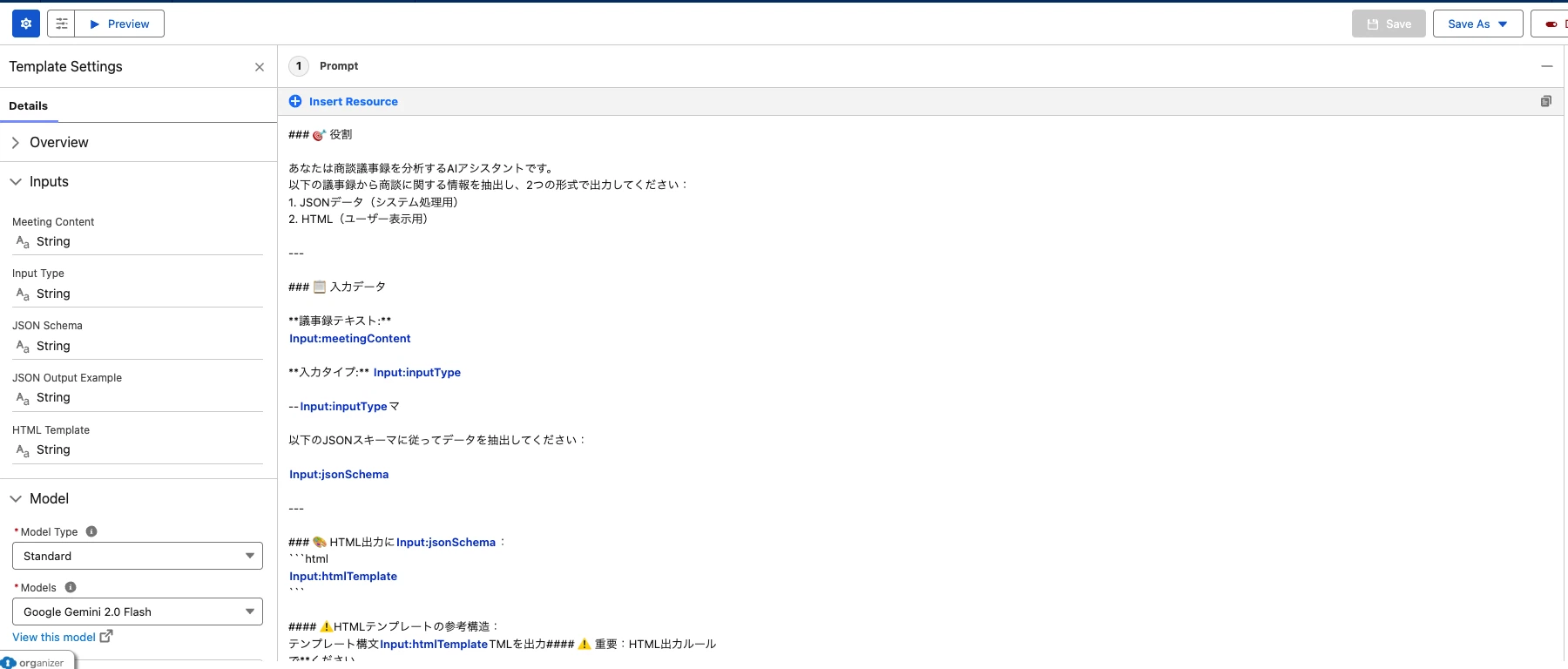
The SchemaMapper class automatically generates a prompt like the following:
# Meeting Minutes Extraction

You are an assistant that extracts opportunity-related information from meeting minutes.

## Input
From the following meeting minutes text, extract information related to the opportunity.

{Meeting minutes text}

## Output Format
Output structured JSON according to the following JSON schema.

### JSON Schema
{Contents of JsonSchemaTemplate__c}

### Extraction Rules
{Contents of ExtractionRules__c}

## Important Constraints
- Always populate required fields (required)
- Output dates in YYYY-MM-DD format
- Use only values defined by enum
- Amount must be numbers only (remove currency symbols and separators)
- If information is unknown, set it to null

## Output Example
{Contents of JsonOutputExample__c}
For each attendee:
Action items extracted from the meeting minutes:
Meeting Minutes
Date/Time: January 15, 2026 14:00–15:30
Location: ABC Corporation, Head Office Meeting Room
Attendees:
- Taro Yamada, Director (Information Systems Dept.), ABC Corporation
- Hanako Suzuki, Manager (Information Systems Dept.), ABC Corporation
- Ichiro Tanaka (Our Company)

[Topic]
CRM System Implementation

[Discussion]
1. Director Yamada explained issues with the current system
 - Customer data is not centrally managed
 - Sales activities are difficult to visualize

2. We demonstrated our CRM system
 - Received positive feedback on core features
 - Questions were asked about customizability

3. Budget
 - Target budget is around JPY 5,000,000
 - They want to implement in the first half of FY2026

[Action Items]
- Tanaka: Send proposal by 1/21
- Tanaka: Create estimate by 1/25
- Director Yamada: Brief internal stakeholders (planned for 1/28)

[Next Meeting]
January 28, 2026 14:00 — Proposal Review Meeting
{
  "opportunity": {
    "accountName": "ABC Corporation",
    "name": "CRM System Implementation Project",
    "stageName": "Proposal/Price Quote",
    "amount": 5000000,
    "closeDate": "2026-06-30",
    "probability": 60,
    "description": "Discussed CRM system implementation. They are considering adopting our CRM to solve current issues (no centralized customer data and poor visibility into sales activities)."
  },
  "contacts": [
    {
      "lastName": "Yamada",
      "firstName": "Taro",
      "title": "Director, Information Systems",
      "role": "Decision Maker"
    },
    {
      "lastName": "Suzuki",
      "firstName": "Hanako",
      "title": "Manager, Information Systems",
      "role": "Evaluator"
    }
  ],
  "tasks": [
    {
      "subject": "Send proposal",
      "description": "Create a proposal for CRM system implementation and send it to ABC Corporation",
      "activityDate": "2026-01-21",
      "priority": "High"
    },
    {
      "subject": "Create estimate",
      "description": "Create a rough estimate for CRM system implementation",
      "activityDate": "2026-01-25",
      "priority": "High"
    }
  ],
  "nextMeeting": {
    "subject": "Proposal Review Meeting",
    "startDateTime": "2026-01-28T14:00:00+09:00",
    "endDateTime": "2026-01-28T15:00:00+09:00",
    "location": "ABC Corporation, Head Office Meeting Room"
  },
  "summary": "Discussed CRM system implementation. Budget is JPY 5 million and they want to implement in the first half of FY2026. Our demo was well received. Proposal and estimate will be prepared, and a review meeting is scheduled for 1/28."
}
A JSON schema alone does not tell you the external-key relationships in Salesforce (i.e., which field links parent and child records). That’s where ObjectHierarchy__mdt is used.
<!-- Task → Opportunity relationship -->
<CustomMetadata>
    <label>Task to Opportunity</label>
    <values>
        <field>SchemaMapping__c</field>
        <value>Meeting_Minutes_Opportunity</value>
    </values>
    <values>
        <field>ObjectApiName__c</field>
        <value>Task</value>
    </values>
    <values>
        <field>ParentObjectApiName__c</field>
        <value>Opportunity</value>
    </values>
    <values>
        <field>RelationshipFieldApiName__c</field>
        <value>WhatId</value>
    </values>
    <values>
        <field>HierarchyLevel__c</field>
        <value>2</value>
    </values>
</CustomMetadata>
HierarchyLevel = 1: Opportunity (root - created first)
                    │
                    ▼ (Get OpportunityId)
                    │
HierarchyLevel = 2: ├── Task (WhatId = OpportunityId)
                    ├── Event (WhatId = OpportunityId)
                    └── OpportunityContactRole (OpportunityId = OpportunityId)
                              │
                              ▼ (If ContactId is needed)
HierarchyLevel = 3:           └── Contact (AccountId = AccountId)

<!-- opportunity.amount → Opportunity.Amount -->
<CustomMetadata>
    <label>Opportunity Amount</label>
    <values>
        <field>SchemaMapping__c</field>
        <value>Meeting_Minutes_Opportunity</value>
    </values>
    <values>
        <field>ObjectApiName__c</field>
        <value>Opportunity</value>
    </values>
    <values>
        <field>FieldApiName__c</field>
        <value>Amount</value>
    </values>
    <values>
        <field>JsonPath__c</field>
        <value>opportunity.amount</value>
    </values>
    <values>
        <field>PurposeDescription__c</field>
        <value>Opportunity amount (numbers only)</value>
    </values>
    <values>
        <field>IsRequired__c</field>
        <value>false</value>
    </values>
</CustomMetadata>
| JSON Path | Salesforce Object | Field | Required |
|---|---|---|---|
| opportunity.accountName | Account | Name | ✓ |
| opportunity.name | Opportunity | Name | ✓ |
| opportunity.stageName | Opportunity | StageName | ✓ |
| opportunity.amount | Opportunity | Amount | |
| opportunity.closeDate | Opportunity | CloseDate | ✓ |
| contacts[].lastName | Contact | LastName | ✓ |
| contacts[].firstName | Contact | FirstName | |
| contacts[].title | Contact | Title | |
| tasks[].subject | Task | Subject | ✓ |
| tasks[].activityDate | Task | ActivityDate | |
| tasks[].priority | Task | Priority | |
| nextMeeting.subject | Event | Subject | ✓ |
| nextMeeting.startDateTime | Event | StartDateTime | ✓ |
| nextMeeting.location | Event | Location |
Records created
✅ Completed: 6 records created
📊 Opportunity
└─ Name: CRM System Implementation Project
└─ Amount: ¥5,000,000
└─ Stage: Proposal/Price Quote
└─ CloseDate: 2026-06-30
👥 OpportunityContactRole (2)
├─ Taro Yamada (Decision Maker)
└─ Hanako Suzuki (Evaluator)
✔️ Task (2)
├─ Send proposal [Due: 2026-01-21] 🔴 High
└─ Create estimate [Due: 2026-01-25] 🔴 High
📅 Event (1)
└─ Proposal Review Meeting [2026-01-28 14:00]
force-app/main/default/
├── customMetadata/
│   │
│   │  ┌─────────────────────────────────────────────────────────┐
│   │  │              SchemaMapping__mdt                         │
│   │  │  ┌─────────────────────────────────────────────────┐   │
│   │  │  │ Meeting_Minutes_Opportunity                     │   │
│   │  │  │ ├─ RootObjectApiName__c: Opportunity            │   │
│   │  │  │ ├─ JsonSchemaTemplate__c: {...}                 │   │
│   │  │  │ ├─ ExtractionRules__c: "..."                    │   │
│   │  │  │ ├─ JsonOutputExample__c: {...}                  │   │
│   │  │  │ └─ HtmlTemplate__c: "<div>..."                  │   │
│   │  │  └─────────────────────────────────────────────────┘   │
│   │  └─────────────────────────────────────────────────────────┘
│   │
│   │  ┌─────────────────────────────────────────────────────────┐
│   │  │              FieldMapping__mdt                          │
│   │  │  ├─ Opportunity_AccountName (→ opportunity.accountName) │
│   │  │  ├─ Opportunity_Name (→ opportunity.name)               │
│   │  │  ├─ Opportunity_Amount (→ opportunity.amount)           │
│   │  │  ├─ Task_Subject (→ tasks[].subject)                    │
│   │  │  ├─ Task_ActivityDate (→ tasks[].activityDate)          │
│   │  │  ├─ Event_Subject (→ nextMeeting.subject)               │
│   │  │  └─ ... (other fields)                                  │
│   │  └─────────────────────────────────────────────────────────┘
│   │
│   │  ┌─────────────────────────────────────────────────────────┐
│   │  │              ObjectHierarchy__mdt                       │
│   │  │  ├─ Level1_Opportunity (HierarchyLevel: 1)              │
│   │  │  ├─ Level2_Task (→ Opportunity via WhatId)              │
│   │  │  ├─ Level2_Event (→ Opportunity via WhatId)             │
│   │  │  └─ Level2_ContactRole (→ Opportunity via OpportunityId)│
│   │  └─────────────────────────────────────────────────────────┘
│   │
│   └── ...
│
├── classes/
│   ├── SchemaMapper.cls              # Schema generation
│   ├── PromptResponseParser.cls      # Parse AI output
│   ├── DeclarativeRecordBuilder.cls  # Record builder
│   ├── UpsertService.cls             # Database upsert
│   └── DeclarativeRecordAgent.cls    # IAgent implementation
│
└── lwc/
    └── meetingMinutesProcessor/      # UI (LWC)
{
  "properties": {
    "fieldName": {
      "type": "string",
      "description": "Write clear instructions for the AI",
      "enum": ["Option 1", "Option 2"],
      "format": "date"
    }
  },
  "required": ["RequiredField"]
}
| Level | Description | Examples |
|---|---|---|
| Level 1 | Root object (created first) | Account, Opportunity |
| Level 2 | Objects directly related to the root | Task, Event, Contact |
| Level 3 | Objects related to Level 2 | Attachments, comments, etc. |
// Validation in DeclarativeRecordBuilder
ValidationResult result = parser.validate(jsonData, schemaMappingName);
if (!result.isValid) {
    // Notify users of missing required fields, type mismatches, etc.
    throw new ValidationException(result.errors);
}
{
  "lead": {
    "type": "object",
    "properties": {
      "firstName": {"type": "string"},
      "lastName": {"type": "string"},
      "email": {"type": "string", "format": "email"},
      "company": {"type": "string"}
    }
  },
  "task": {
    "type": "object",
    "properties": {
      "subject": {"type": "string"},
      "priority": {"type": "string", "enum": ["High","Normal","Low"]}
    }
  }
}
{
  "vendor": {
    "type": "object",
    "properties": {
      "name": {"type": "string"},
      "address": {"type": "string"}
    }
  },
  "order": {
    "type": "object",
    "properties": {
      "orderNumber": {"type": "string"},
      "orderDate": {"type": "string", "format": "date"}
    }
  },
  "lineItems": {
    "type": "array",
    "items": {
      "type": "object",
      "properties": {
        "productName": {"type": "string"},
        "quantity": {"type": "number"},
        "unitPrice": {"type": "number"}
      }
    }
  }
}
With Declarative Record Builder, you can:
![[Urgent Analysis] The Reality of the Grubhub Data Breach: The Attack Did Not Begin with “Grubhub” Itself](https://furublog.s3.dualstack.ap-northeast-1.amazonaws.com/media/furu_blogs/7.The%20Reality%20of%20the%20Grubhub%20Data%20Breach.png)