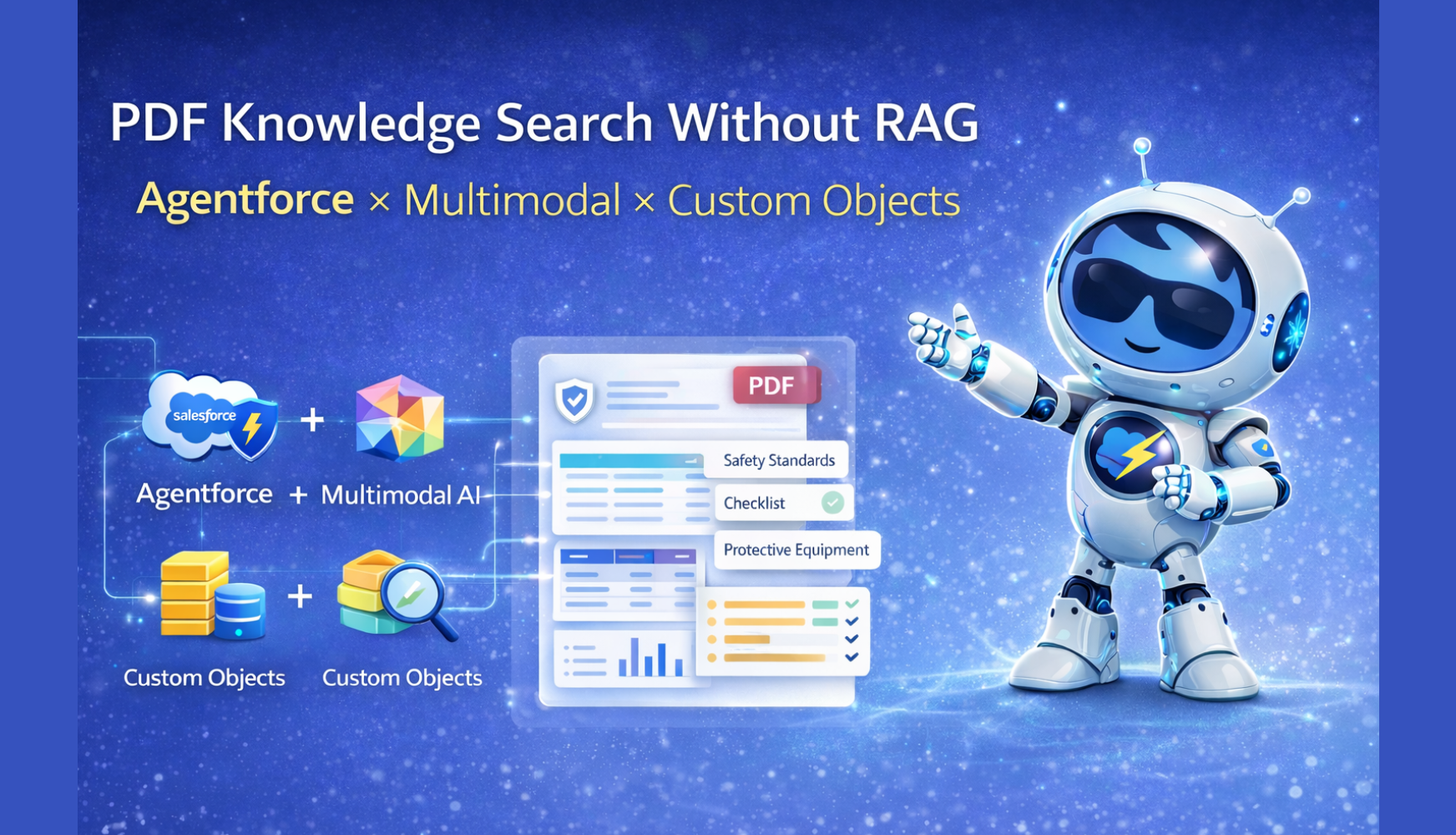
“Can PDF knowledge base search and Q&A be implemented without RAG (Retrieval Augmented Generation)?”
Prompted by this question from a client, we conducted a validation combining Salesforce Agentforce and Multimodal AI. In this blog, we share the results of that validation and the implementation approach.
Salesforce Intelligent Context and data library features work by indexing documents and retrieving relevant content through semantic search. However, there are challenges such as the following.
Validation Question: “Can we achieve equivalent or better quality without RAG?”
To answer this question, we validated an approach that combines PDF analysis using Multimodal AI (Gemini 2.5 Pro) with custom objects and tag-based search.
PDFs that contain complex tables, charts, and graphs can be difficult to preserve accurately in terms of structure and numeric relationships when using only conventional text extraction or OCR.
By leveraging the multimodal capability of Gemini 2.5 Pro, we enabled the model to “look at” and understand PDFs, then structure them as follows.
<table><h1> to <h6>, <p>, <section>)As a result, we confirmed that it is possible to accumulate knowledge in a way that preserves PDF structure and numeric information without relying on Intelligent Context or a data library.
[PDF File]
    ↓ Processed asynchronously by batch (PDFExtractBatch / PDFExtractScheduler)
    ↓ Extracted and structured with Multimodal (Gemini 2.5 Pro)
[PDFExtract Prompt Template]
    ↓ Chunk split and automatic tag generation
[PDF_Knowledge__c] Custom Object
    - Chunk1 to 10 (HTML format)
    - Tag (for search)
    - FileName, FilePath (source information)
    ↓
[PDFTag__c] Master of all tags
    ↓
[User Question] → Agentforce Topic Instruction
    ↓ Calls the appropriate action
[Evaluate_PDF_Tags] LLM evaluates the relevance between the question and tags
    ↓ Identifies relevant tags
[PDF_Knowledge__c Search] LIKE search by tags
    ↓ Retrieves matching chunks
[Search_PDF_Knowledge] Generates response with sources
    ↓
[HTML Response]
PDF_Knowledge__c, PDFTag__cWe confirmed that even for PDFs containing complex diagrams and tables, extraction can preserve both numerical values and structural relationships.
RAG typically retrieves semantically similar documents through vector search. In this validation, we instead adopted the following.
Evaluate_PDF_Tags Prompt Template uses an LLM to evaluate the relationship between the user’s question and all tagsPDF_Knowledge__c and retrieve matching chunksBy incorporating an expert perspective for each domain into the prompts, we improve the stability of tag evaluation.
Search PDF Knowledge actionSearchPDFKnowledge orchestrates tag evaluation → search → answer generationIn this validation, we tested operation using a scenario based on manufacturing product manuals and safety standards.
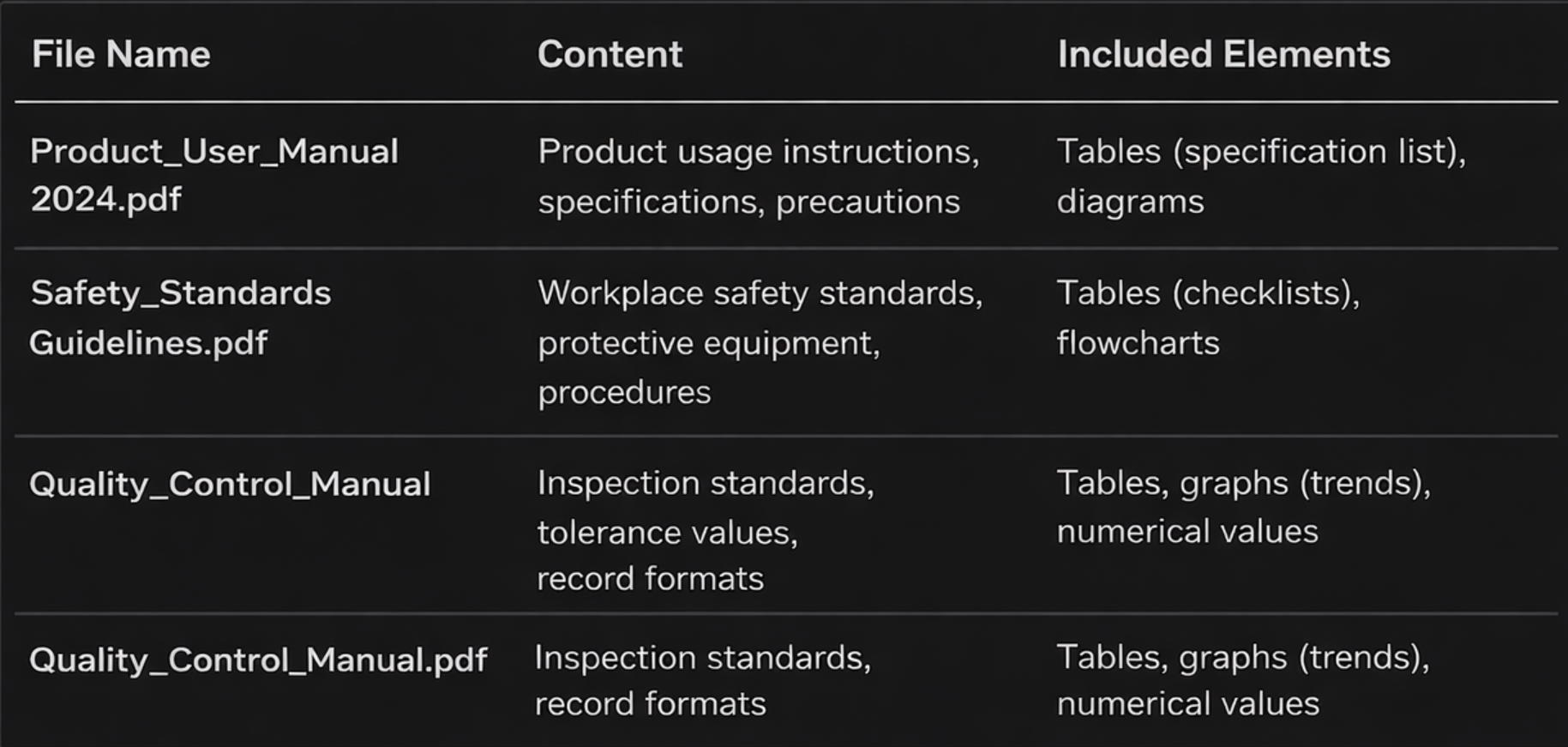
"Product Specifications","Handling Instructions","Safety Standards","Protective Equipment","Procedure","Quality Control",
"Inspection Standards","Tolerance Values","Checklist","Record Format","Illustration","Flowchart"
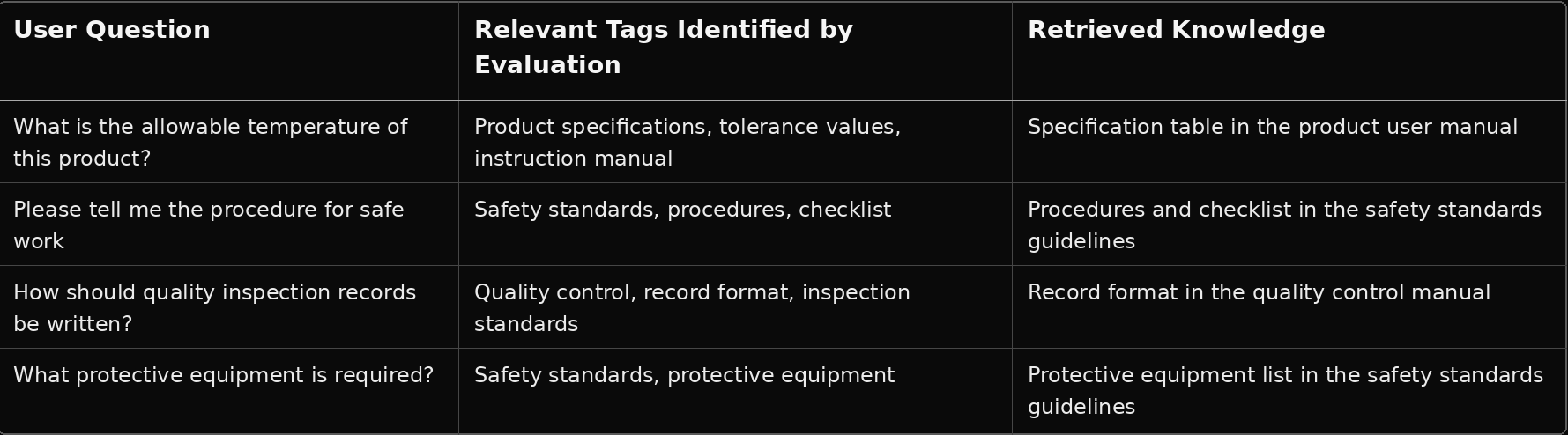
1. The user asks the Agent a question
→ “Please explain the safety procedures”

2. Topic Instruction interprets the question
→ Calls the Search PDF Knowledge action

3. Evaluate_PDF_Tags evaluates the tags
→ Input: Search_Term="Please explain the safety procedures", All_Tags_Str="Product Specifications","Safety Standards",...
→ Output: relatedTags=["Safety Standards","Procedure","Checklist"]

4. Search PDF_Knowledge__c by tags
→ TagSearch__c LIKE '%Safety Standards%' OR LIKE '%Procedure%' OR LIKE '%Checklist%'

5. Retrieve matching chunks
→ Matching section from Safety Standards Guideline.pdf

6. Search_PDF_Knowledge generates the answer
→ “The safety procedures are as follows: 1) Confirm wearing protective equipment 2) ...”
→ Source: Safety Standards Guideline.pdf
Below are examples of each prompt’s role and sample descriptions tailored to the manufacturing scenario.
Role: Uses Multimodal AI to analyze the PDF and perform HTML structuring, chunk splitting, and tag generation.
Main Instructions (Excerpt):
- Tables → Convert to HTML <table>
- Charts and graphs → Store data points as HTML tables
- Wrap sections with <section> or <div class='section'>
- Generate 3 to 15 tags from the document content (e.g. "Product Specifications","Safety Standards","Tolerance Values")
- Output in JSON format (chunks, tags), and escape " as \" within strings
Role: Evaluates the relationship between the user’s question and all tags, and identifies relevant tags.
Input: `Search_Term`, `All_Tags_Str`
Main Instructions (Excerpt):
ROLE: As a document specialist, pick up all tags that connect to the knowledge needed to answer the question.

EVALUATION:
- Direct match: The question’s keyword is included in a tag
- Partial match: A tag is a compound term that contains the concept
- Semantic relevance: A tag belongs to the same domain
- Means/Method: If the question asks “how,” include tags related to procedures and checklists

DOMAIN HINTS (Manufacturing / Quality Control example):
- Specifications / Tolerance values → Product Specifications, Tolerance Values, Handling Instructions, Inspection Standards
- Procedure / Method → Safety Standards, Procedure, Checklist, Record Format
- Protection / Safety → Protective Equipment, Safety Standards
Output Example:
{"relatedTags": ["Safety Standards", "Procedure", "Checklist"]}
Role: Refers to the knowledge obtained by the search and generates an answer with source attribution.
Input: `Search_Term`, `Search_Results` (JSON of knowledge + sources)
Main Instructions (Excerpt):
- Refer only to the knowledge in the search results; do not fabricate information
- Always clearly indicate the source (e.g. Source: Internal Manual / Safety Standards Guideline.pdf)
- Return the answer in concise HTML format
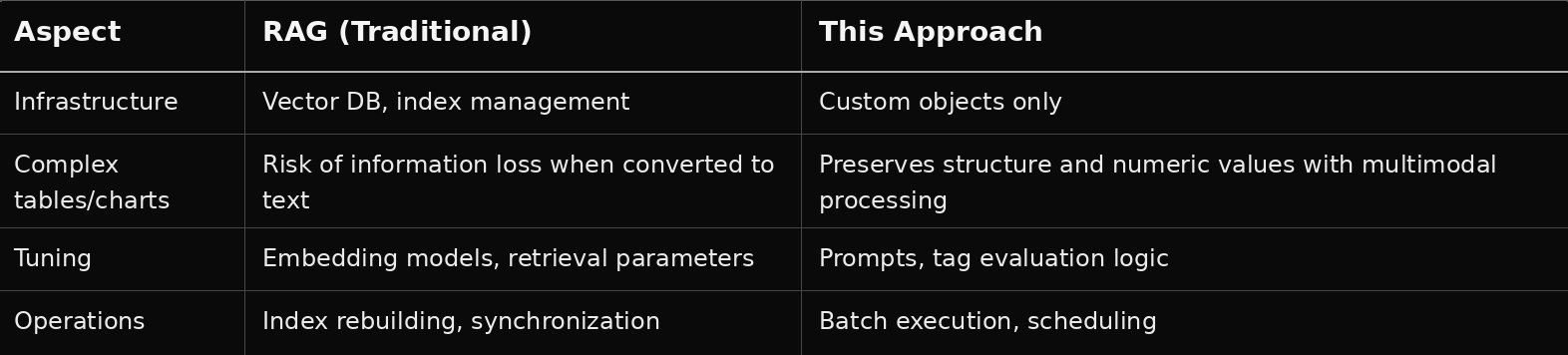
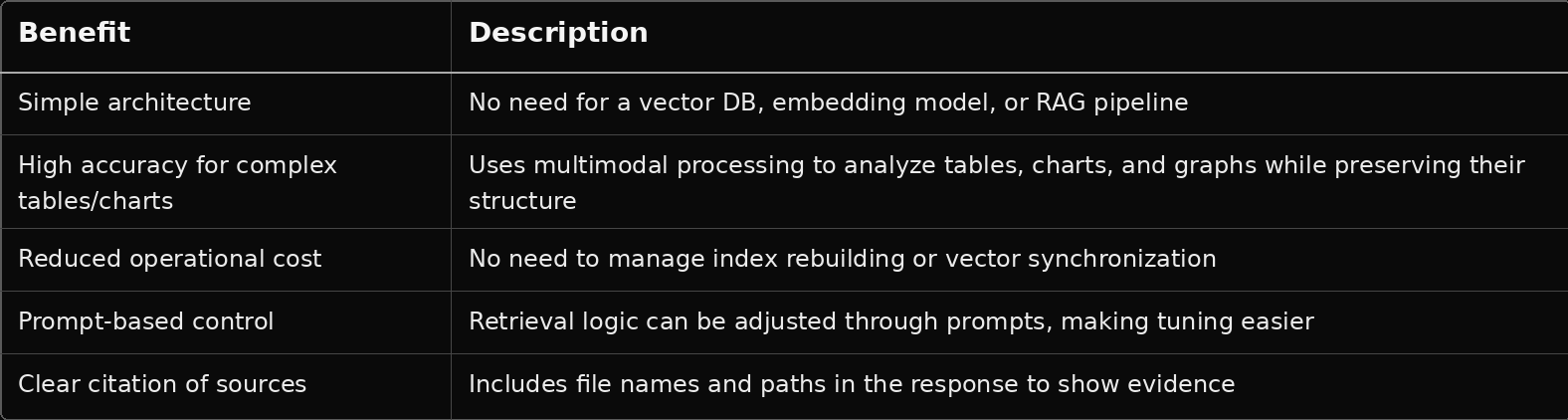
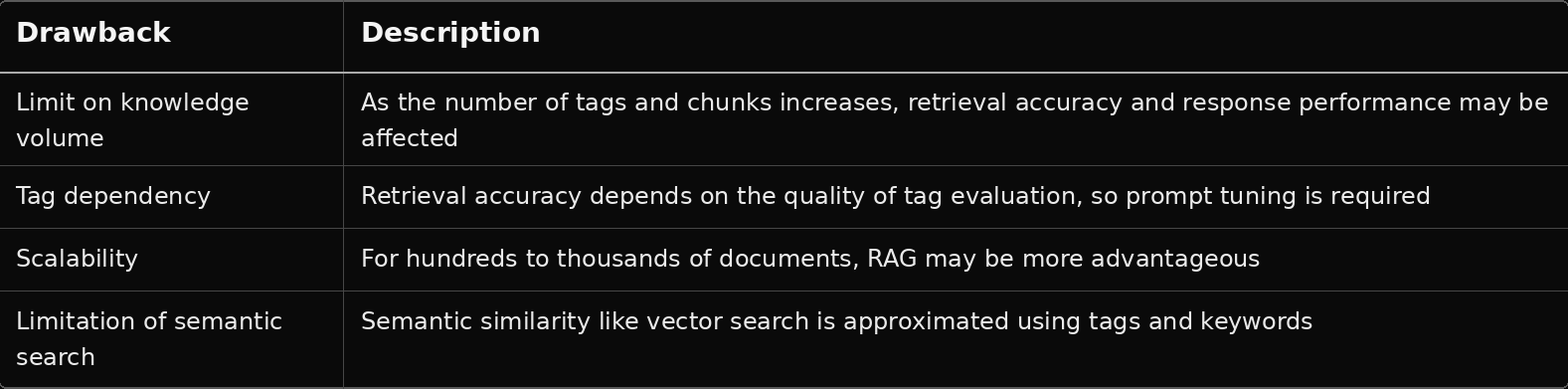
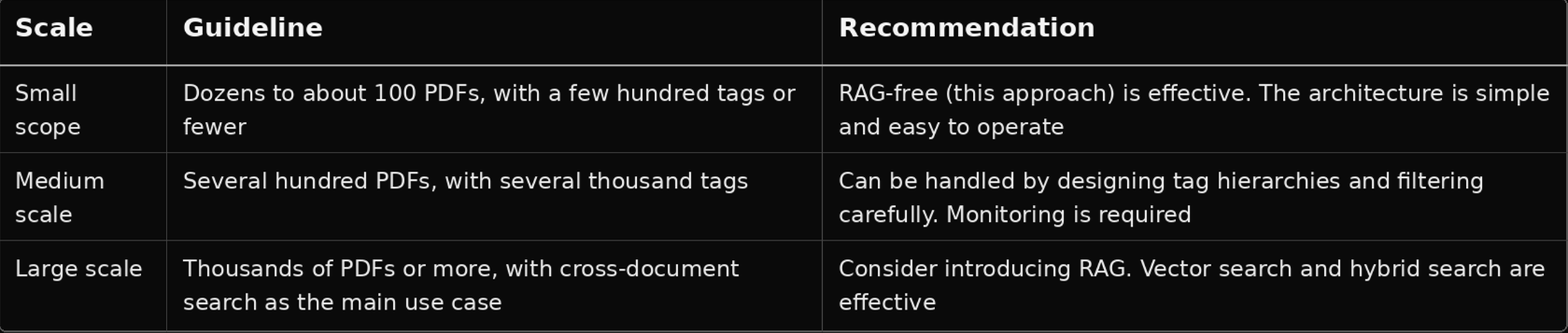
Conclusion: If the scope is limited to internal manuals, product documents, regulations, and similar materials, this approach is sufficiently practical without RAG. Once cross-domain or large-scale knowledge search becomes necessary, it is realistic to consider moving to RAG or hybrid search.
Gemini 2.5 Pro, which was used in this validation, differs from RAG (which injects retrieved fragments into prompts) in that it has a large context window capable of injecting file content directly into the prompt as-is.
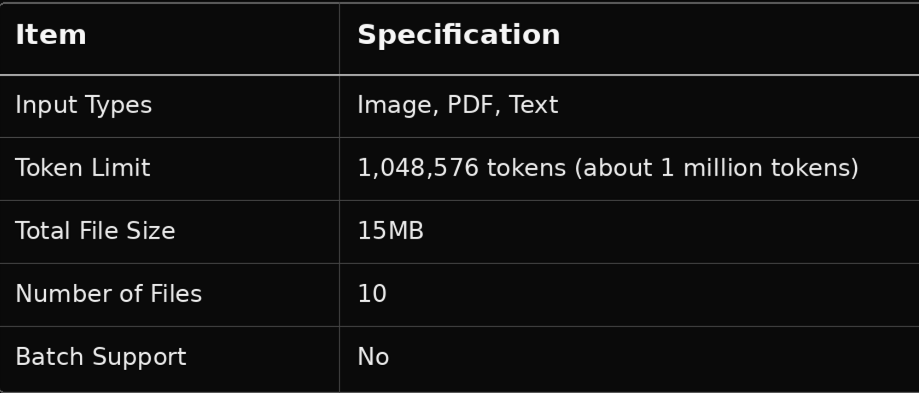
The conversion between token count and character count varies depending on the language and writing system. For Japanese, it is generally estimated that 1 token ≈ 2 to 3 characters (mixed kanji and kana text).

* Excluding output tokens, about 980,000 tokens can be used for input. The above is a theoretical maximum-level estimate.
As a practical guideline, for Japanese PDFs or text, roughly 1.5 to 2 million characters can be passed as context in a single prompt call. In terms of ordinary business documents (about 500 to 800 characters per page), this corresponds to approximately 2,000 to 4,000 pages.
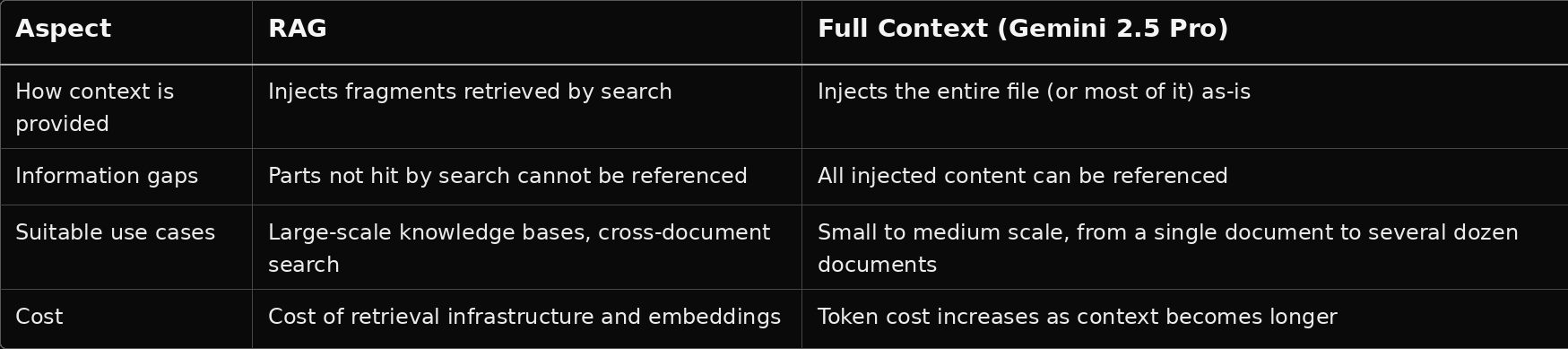
The key point is that when the knowledge volume fits within roughly 1 million characters, directly injecting the relevant content into the prompt using a Full Context approach can be simpler and less likely to lose information than using RAG to “search → retrieve fragments.” In this validation, we adopted a hybrid approach in which PDFs are chunked and stored in custom objects, filtered by tags, and then the relevant chunks are passed into the prompt.
To answer the question, “Can this be achieved without RAG?”, we validated that a combination of multimodal PDF analysis, custom objects, and tag-based search can achieve equal or better quality.
When handling PDFs that contain complex tables, charts, and graphs, structuring with Multimodal AI is effective, and even with a simple architecture that does not rely on RAG, practical knowledge search and answer generation can be achieved.
This blog is intended to share validation results. When applying this approach in a production environment, we recommend evaluation and tuning according to your specific environment.
![[Urgent Analysis] The Reality of the Grubhub Data Breach: The Attack Did Not Begin with “Grubhub” Itself](https://furublog.s3.dualstack.ap-northeast-1.amazonaws.com/media/furu_blogs/7.The%20Reality%20of%20the%20Grubhub%20Data%20Breach.png)