Target Readers: Agentforce implementation support providers, implementation vendors, and architects
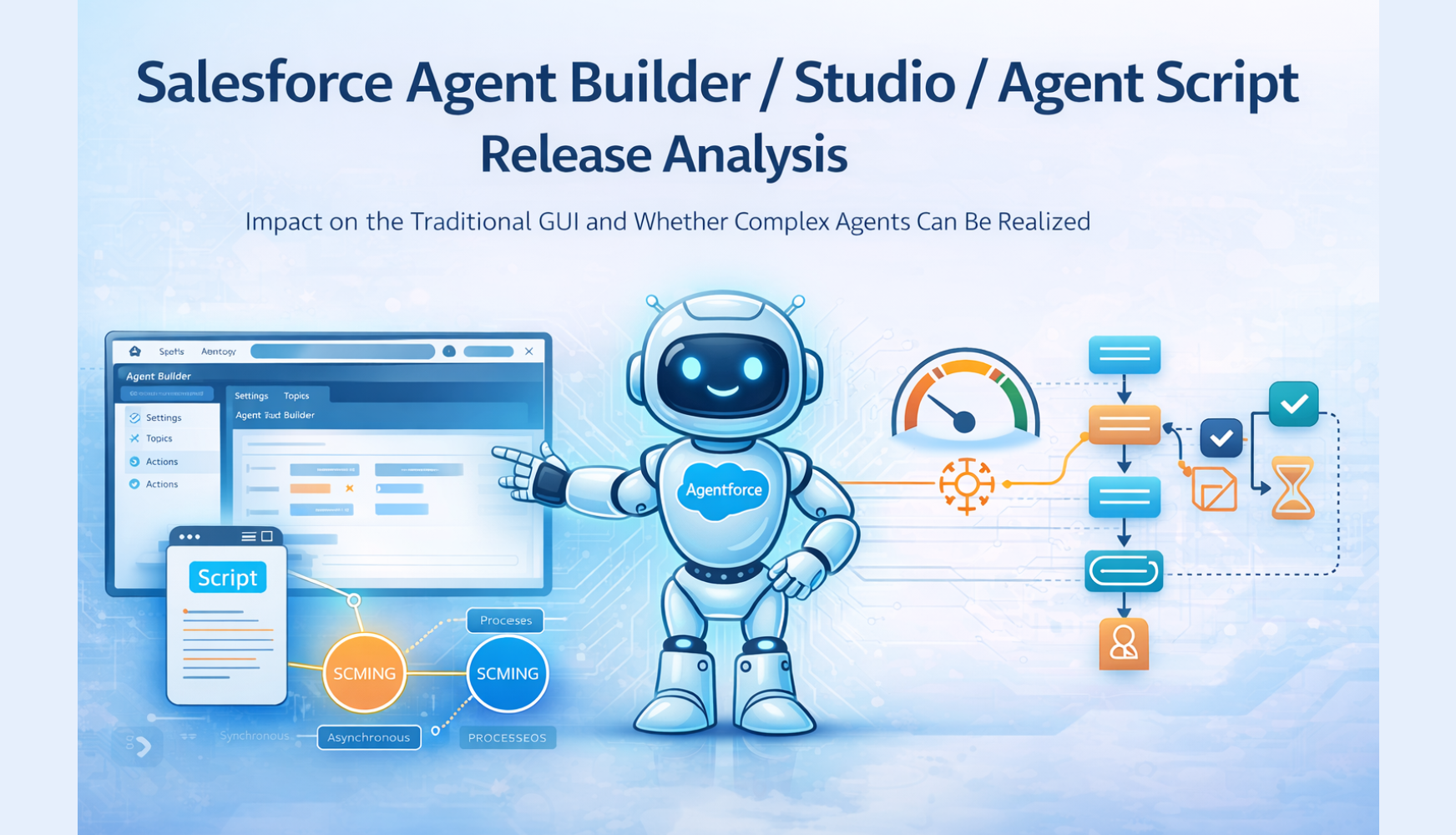
Objective: To organize the impact of the new release on the traditional GUI, Topics, and Actions, and to analyze and document whether “multiple synchronous/asynchronous processes from a single instruction” can be realized with Agent Script alone, and how much dedicated workflow design or Chat customization is still required.
1. Release Overview
Salesforce released Agent Builder (the new Agentforce Builder), Studio, and Agent Script (announced at Dreamforce 2025, and expected to become available in Japan around February 2026).
2. Impact on the Traditional GUI, Agent Topics, and Actions
2.1 Structural Changes (Explorer)
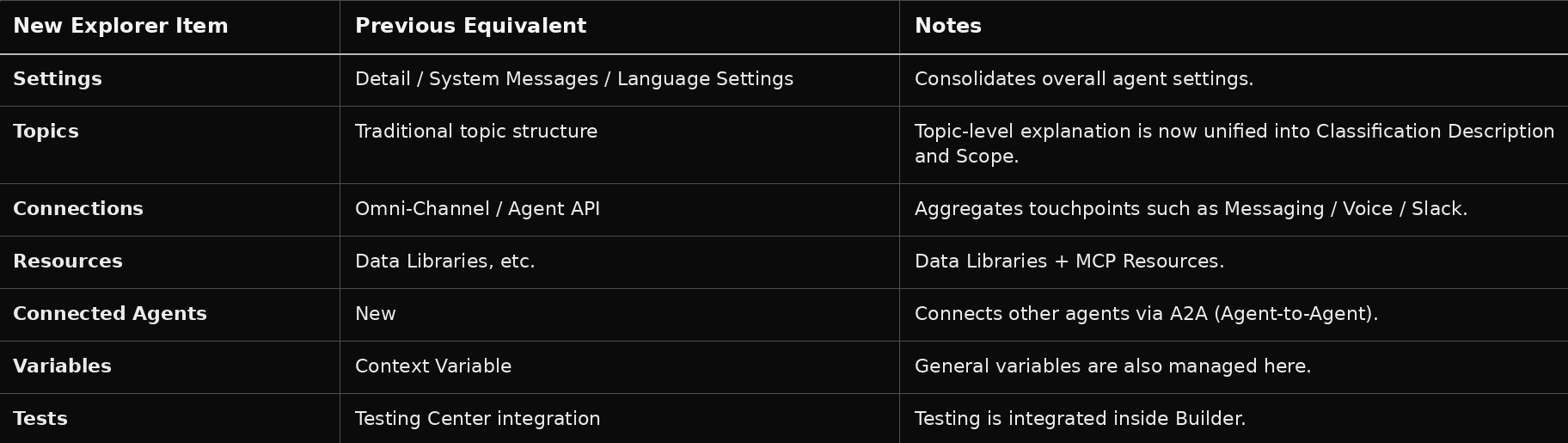
In the new Builder, the Explorer panel on the left reorganizes the conventional settings as follows.
2.2 Changes to Topics
- Integration of Classification Description and Scope
The conventional separation between “how to classify” and “what this Topic does” has been merged into a single Topic description. Because inter-topic transitions have been added, roles can now be divided not only by the “initial classification” but also by the “destination Topic,” making it easier to avoid duplicated descriptions.
- Inter-Topic Transitions
With transition to @topic.XXX in Agent Script, multiple Topics can now be traversed sequentially within a single conversation flow. The traditional constraint of “1 utterance = 1 Topic” has been relaxed.
- Off Topic
Off Topic, which was previously treated internally and hidden, is now explicitly shown in the new Builder, suggesting the possibility of customization as well (the exact GA specification still needs to be confirmed).
2.3 How Actions Are Handled
- The Topic-Based Association Remains
Actions are still tied to Topics. Rather than being directly attached to the Agent, the hierarchy of “Topic → Actions” remains unchanged.
- Calling from Agent Script
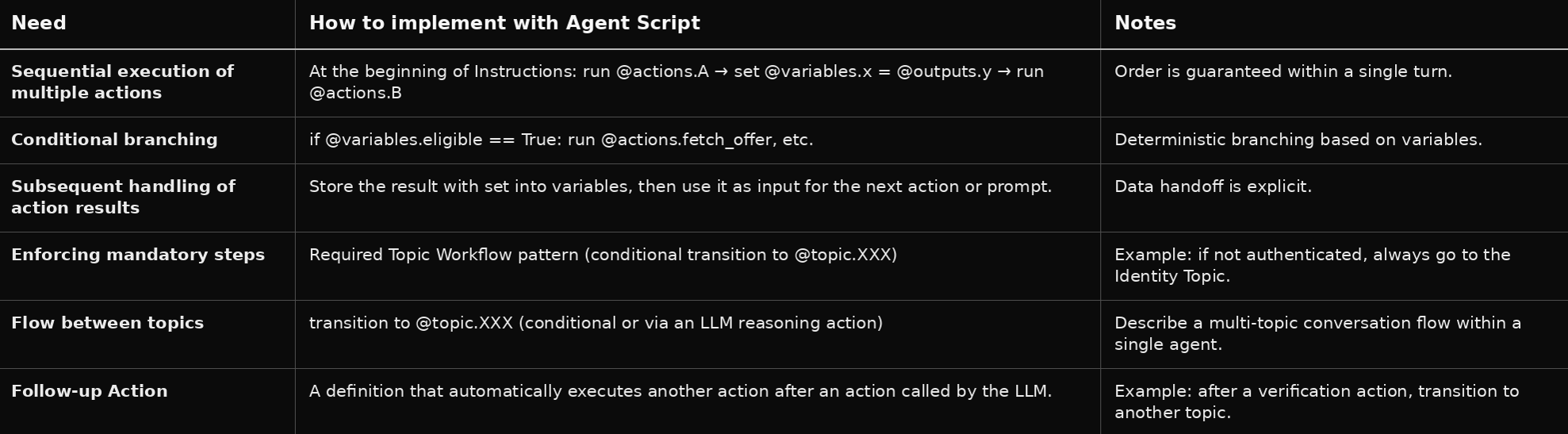
Within Instructions, run @actions.XXX can be used to describe sequential execution, conditional execution, and follow-up execution. In addition to the conventional model where the LLM chooses and executes an Action, it is now possible to write deterministic Action chains.
Summary: While the traditional concepts of GUI, Topics, and Actions remain, they have been expanded through setting consolidation, the addition of transitions, and deterministic control. The expected migration path is to preserve existing Topic/Action design while strengthening control through Script.
3. Complex Agents — Multiple Synchronous / Asynchronous Processes from a Single Instruction
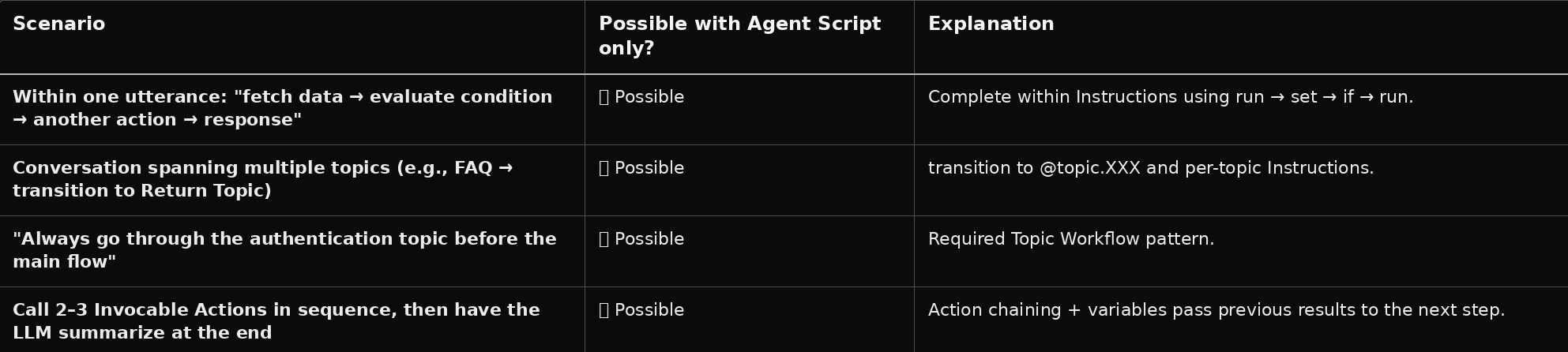
3.1 What Agent Script Can Do (Synchronous, Sequential, Conditional)
All of these are completed within the framework of “1 request / 1 response.” In other words, for a single user utterance, executing multiple synchronous processes in sequence can be realized using Agent Script alone.
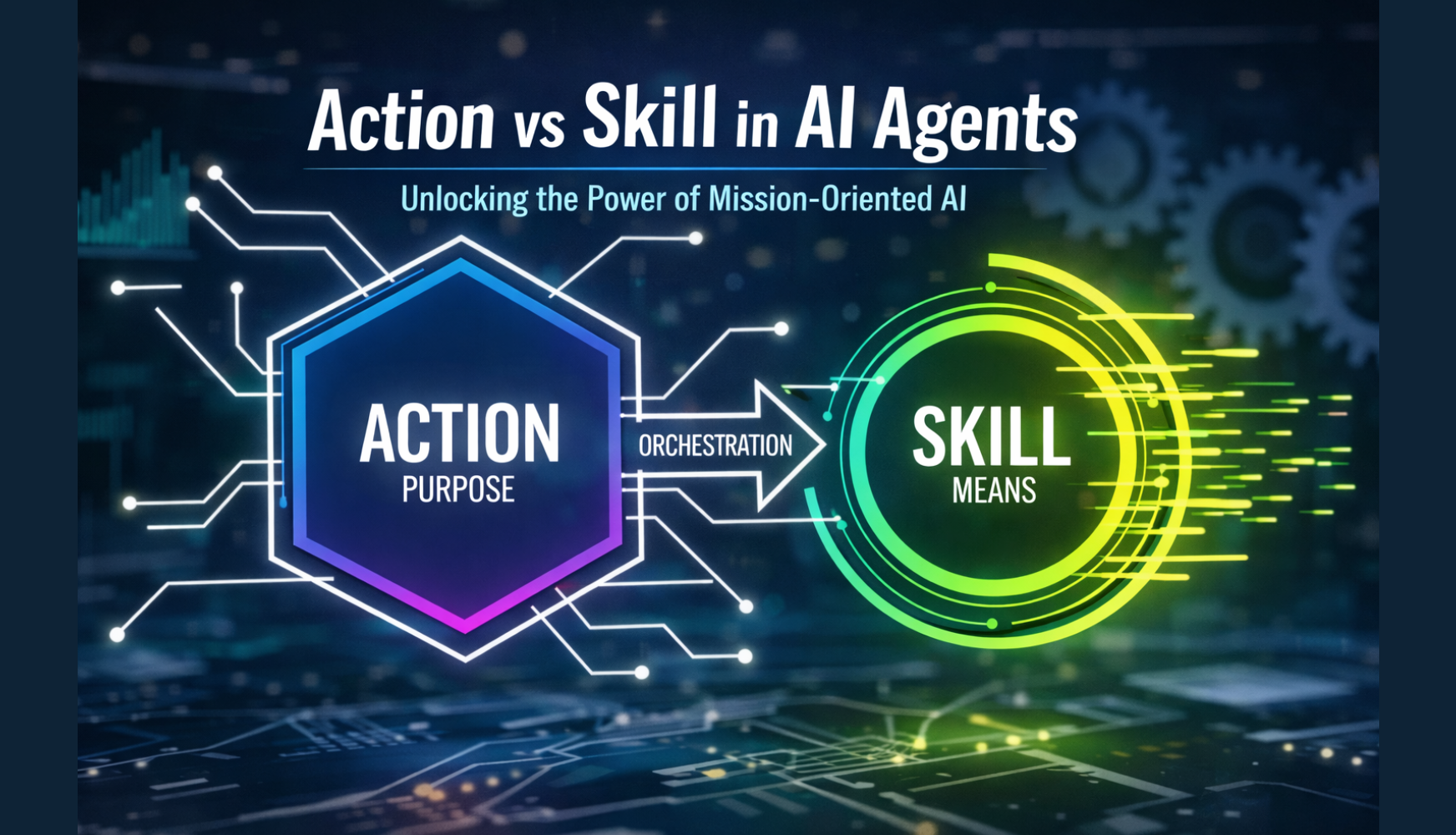
3.2 The Execution Model of Agent Script and the Position of “Asynchronous”
- Flow Control
Reasoning instructions are executed sequentially from top to bottom, and run / set / if / transition are resolved before the prompt is sent to the LLM. Action calls are synchronous (assuming results are returned within that turn).
- Long-Running / Background Processing
Agent Script itself does not provide a language-level asynchronous primitive like “launch a Queueable and retrieve the result later.”
If asynchronous behavior is required, Queueable or Batch must be started on the Action implementation side (Flow / Invocable Apex), and the agent receives only the Action return value (for example, an execution ID).
“Checking the result” is then handled in a later turn (for example, the user says, “Show me the status,” and an Action for checking status is called).
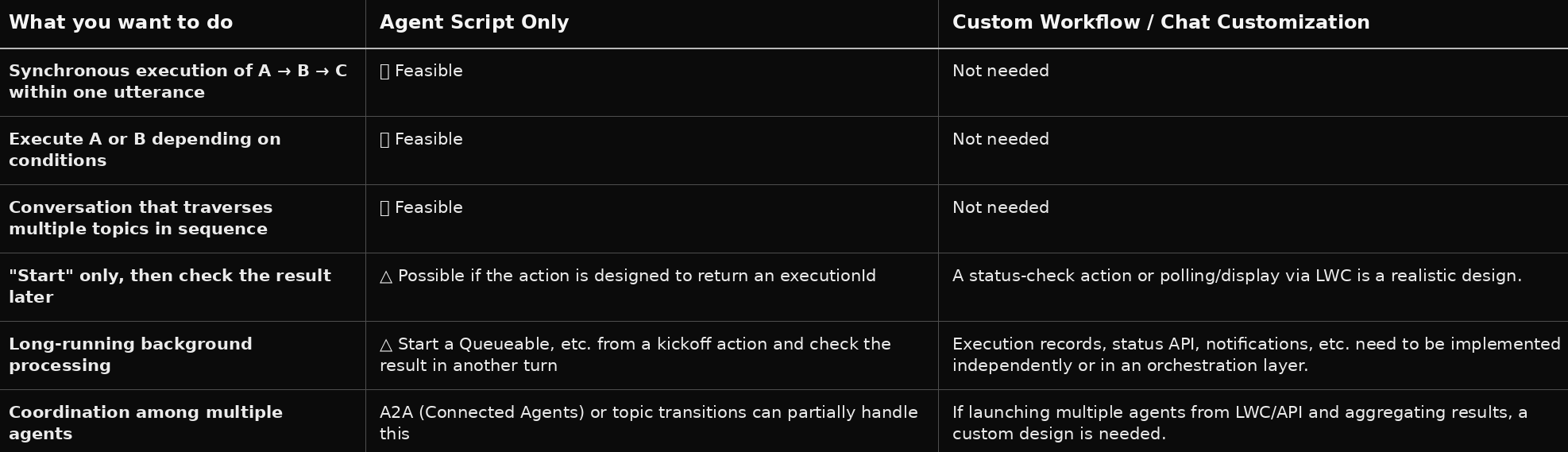
3.3 Division of Responsibilities with Individual Agent Workflows and Chat Customization
Conclusion (Complex Processing):
- Synchronous, sequential, conditional branching, and Topic transitions → can be realized with Agent Script alone.
- Asynchronous, long-running, or “start now → confirm result later” scenarios → Agent Script can be used on the calling side for a “start Action” and a “status-check Action,” but the actual execution (Queueable, state management, polling) must still be implemented on the Action / orchestration side.
4. Agentforce Orchestration and Agent Script — Detailed Comparison and Evaluation
Here, we organize whether a mechanism like Agentforce Orchestration (GenericOrchestrator / StageRunner / synchronous and asynchronous execution strategies) is still necessary for “complex processing / Actions,” or whether Agent Script alone is sufficient.
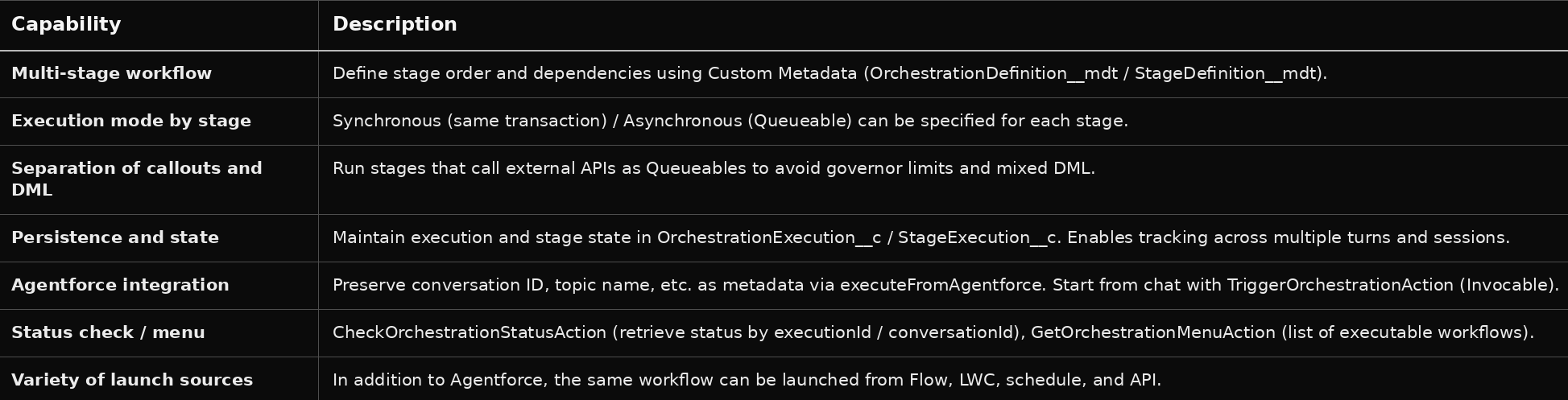
4.1 What Agentforce Orchestration Provides
The Agentforce Orchestration in this project broadly provides the following.
In other words, it handles in a single framework everything up to “executing some stages asynchronously (Queueable), storing the state in the database, and later checking the state or displaying menus.”
4.2 What Can Be Covered by Agent Script Alone
All of these are synchronous executions within a single request, and can be realized with Agent Script and standard Actions (Flow / Invocable) alone, even without an orchestration framework.
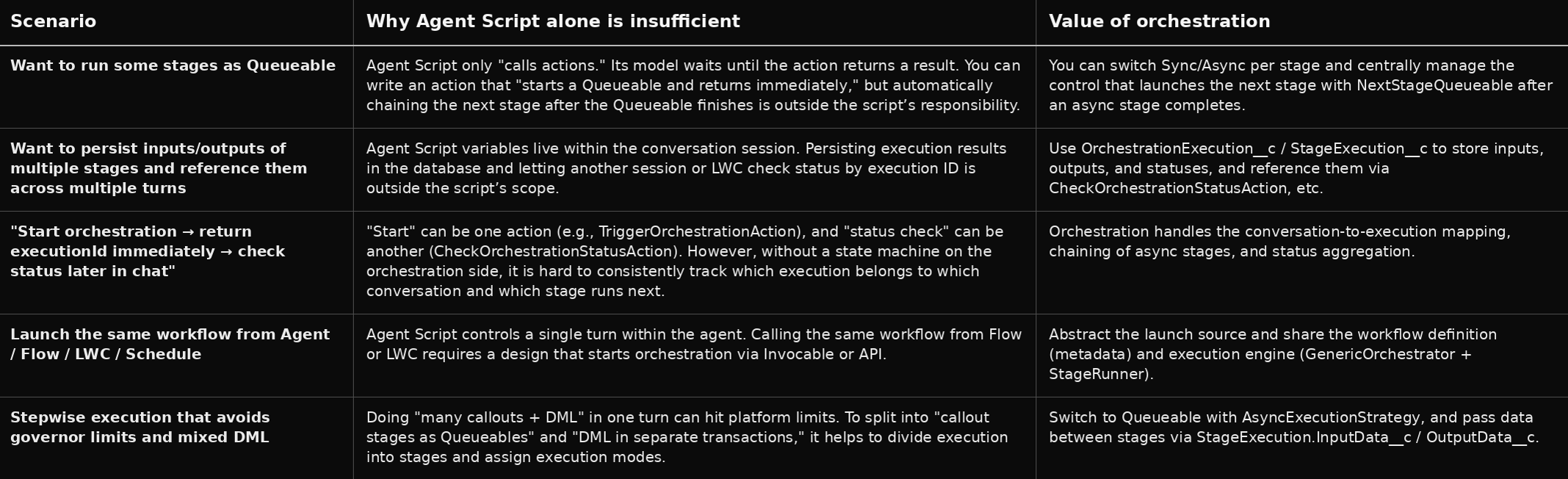
4.3 Cases Where Orchestration (or an Equivalent Mechanism) Is Still Needed
In summary, while Agent Script is sufficient for “complex synchronous flows within a single turn,” an orchestration layer (or a similar design) is still useful for “multiple transactions, multiple turns, asynchronous chains, persistence, and multi-channel invocation.”
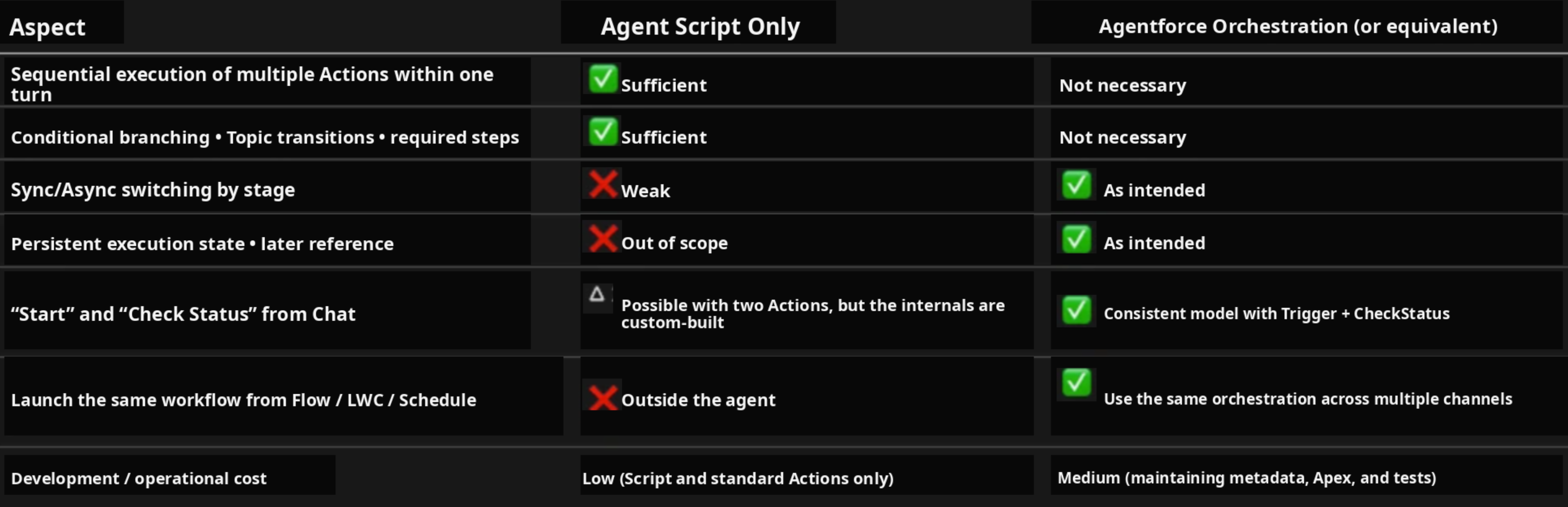
4.4 Evaluation Matrix
4.5 Conclusion — When Orchestration Is Needed, and When Agent Script Alone Is Enough
When Agent Script Alone Is Enough
- When multiple synchronous processes only need to be executed in sequence and conditionally within a single instruction (one utterance).
- Example: Order inquiry → return eligibility check → summarize the result with the LLM and return it.
- At this level of complexity, orchestration is not mandatory. It can be realized with Agent Script’s Action Chaining, conditions, variables, and Topic transitions.
When Orchestration (or an Equivalent Mechanism) Still Remains Effective
- Multi-step scenarios that include asynchronous stages (for example: data collection → external API (Queueable) → write results to the DB, then in a later turn, “show me the result”).
- Auditability, re-execution, and failure recovery based on execution records.
- When the same workflow needs to be launched from multiple channels such as Agent / Flow / LWC / Schedule.
- When Sync / Queueable execution needs to be separated by stage to avoid governor limits or mixed DML issues.
Guidance for Implementation Vendors:
- For new use cases involving multiple steps completed entirely within chat (synchronous only), start by designing with Agent Script alone, and only add Invocables for “start / status check” or an orchestration layer when needed.
- For projects that have already adopted Agentforce Orchestration, orchestration still retains value as long as requirements for asynchronous execution, persistence, and multi-channel invocation remain. A practical hybrid structure is to use Agent Script for clean agent-side control (how Topics and Actions are selected, ordered, and transitioned), while leaving execution of the heavy workflows to orchestration.
5. Checklist for Implementation Vendors and Deployment Support
[ ]
Migration of existing Agents: Understand the new Builder’s Explorer structure (integration of Settings / Topics), and decide on a policy to merge Classification Description and Scope into a single description.
[ ]
Off Topic: Confirm at GA whether Off Topic can be edited in the new Builder, and if necessary, differentiate it from custom guidance Topics.
[ ]
Complex one-turn processing: Implement sequential execution and conditional branching of multiple Actions in Agent Script Instructions, and do not rely excessively on orchestration.
[ ]
Asynchronous, long-running, and status-check scenarios: Only when necessary, prepare orchestration or “start / status-check Invocables,” and design Agent Script to call them as Actions.
[ ]
Tracing and debugging: Use Agent Script compilation results, flow visualization, and Agentforce DX preview / trace features.
6. Reference Links

![[Urgent Analysis] The Reality of the Grubhub Data Breach: The Attack Did Not Begin with “Grubhub” Itself](https://furublog.s3.dualstack.ap-northeast-1.amazonaws.com/media/furu_blogs/7.The%20Reality%20of%20the%20Grubhub%20Data%20Breach.png)