![[Important] Preparation Required for Upcoming Root Certificate Change](https://furublog.s3.dualstack.ap-northeast-1.amazonaws.com/media/furu_blogs/4.Preparation%20Required%20for%20Upcoming%20Root%20Certificate%20Change.png)
To Salesforce administrators and IT department members,
Recently, did you receive an email from Salesforce with the slightly alarming subject line: “【Important】Request for preparation for the root certificate change”?
You might be thinking, “Certificates? Root? Chain? They’re telling me to prepare by Feb 5… what am I supposed to do?!”
But don’t worry. For most users, this is a “no action required” situation.
However, some system integrations have hidden “pitfalls.”
In this article, we summarize—in a checklist format—what will happen and who should check what, using as little technical jargon as possible.
On February 5, 2026, Salesforce will switch its security “identity certificate” to a new one.
Think of it like airport immigration control.
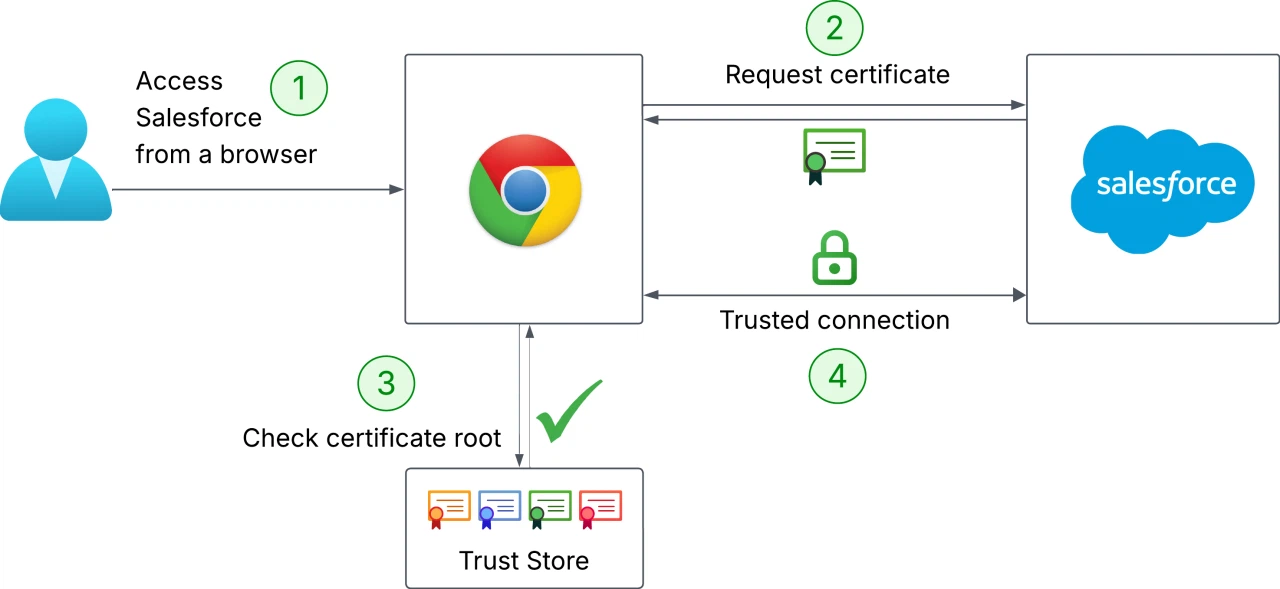
What’s happening this time is that Salesforce will switch to a “passport issued by a new authority (DigiCert G2).”
If your system (the officer) reacts like, “Wait, I don’t know this issuer! Looks suspicious—no entry!” then integration errors will occur.
To prevent this, you need to tell your system: “It’s okay to trust this new issuer as well.”
In general, if you only view Salesforce in a PC browser (Chrome/Edge), you don’t need to do anything (because it updates automatically).
The key risk is when you have “system integrations (API connections).”
Share the checklist below with your IT department or development vendor and ask them to confirm.
Do you send data to Salesforce or retrieve data from it using internal servers or systems on AWS?
If you use Java, be especially careful.
Checkpoint: Confirm your Java version!
*Even with other languages, very old environments may not include the required certificate.
This is an engineering check—and it’s the biggest pitfall.
Have you tightened security too much by implementing code that “only allows communication if the certificate exactly matches a specific older certificate (pinning)”?
Checkpoint:
🔍 Investigation target code examples If you find code like this, a connection error will occur the moment Salesforce switches certificates.
Example 1: Java (typical implementation) A pattern where you implement a custom TrustManager, calculate the hash of the certificate provided by the server, and compare it with a pre-registered hash. // Dangerous example: configured to connect only to a specific hash
private static final String EXPECTED_CERT_HASH = "A1:B2:C3:D4:E5:F6:78:90:A1:B2:C3:D4:E5:F6:78:90:A1:B2:C3:D4:E5:F6:78:90:A1:B2:C3:D4"; // ← This is the embedded “fingerprint”
// ... (omitted) ...
@Override public void checkServerTrusted(X509Certificate[] chain, String authType) throws CertificateException { // Calculate the hash of the server-presented certificate (chain[0]) String serverCertHash = getThumbprint(chain[0]);
// Compare with the pre-embedded hash if (!EXPECTED_CERT_HASH.equalsIgnoreCase(serverCertHash)) { // If it doesn’t match, throw an error (this causes outages) throw new CertificateException("Certificate pinning failure! Server certificate not trusted."); }
}
Example 2: Java / Android (using the OkHttp library) OkHttp, commonly used in modern Java and Android apps, makes pinning very easy to enable via configuration. // Dangerous example: configuration using CertificatePinner
String hostname = "your-instance.salesforce.com"; CertificatePinner certificatePinner = new CertificatePinner.Builder() // ↓ A specific certificate hash is embedded here .add(hostname, "sha256/AAAAAAAAAAAAAAAAAAAAAAAAAAAAAAAAAAAAAAAAAAA=") .build();
OkHttpClient client = new OkHttpClient.Builder() .certificatePinner(certificatePinner) .build();
Example 3: Node.js (https module, etc.) Even in Node.js, you may override the server identity verification logic in connection options and compare hash values. // Dangerous example: comparing hashes via checkServerIdentity
const https = require('https'); const crypto = require('crypto');
// ↓ Embedded hash value const PINNED_FINGERPRINT = 'A1:B2:C3:D4:E5:F6:78:90:A1:B2:C3:D4:E5:F6:78:90:A1:B2:C3:D4:E5:F6:78:90:A1:B2:C3:D4';
const options = { hostname: 'your-instance.salesforce.com', port: 443, method: 'GET', checkServerIdentity: function (host, cert) { // Get the fingerprint of the server certificate const fingerprint = cert.fingerprint256;
// Check whether it matches the embedded value if (fingerprint !== PINNED_FINGERPRINT) { // If it doesn’t match, throw an error (outage) throw new Error('Certificate pinning failed!'); } // Leave hostname verification to the standard logic return tls.checkServerIdentity(host, cert);
} };
// ... connect using https.request(options, ...)
With a “once built, keep running until it breaks” mindset—are there servers that haven’t been updated for over 10 years (e.g., Windows Server 2008) or extremely old Linux distributions involved in the integration?
Checkpoint:
If you are a non-engineer (admin/business user), simply copy the message below and send it to your IT team or development vendor.
A “root certificate change” is like routine “road repaving work” in the internet world.
If you’re driving a well-maintained car (modern browsers/Java), you won’t even notice—but a poorly maintained car (old systems) can get stuck on the bumps.
To avoid panicking on February 5 with “Wait—our integration isn’t working!?”, let’s at least confirm the “Java version” and “pinning settings” now!

![[Urgent Analysis] The Reality of the Grubhub Data Breach: The Attack Did Not Begin with “Grubhub” Itself](https://furublog.s3.dualstack.ap-northeast-1.amazonaws.com/media/furu_blogs/7.The%20Reality%20of%20the%20Grubhub%20Data%20Breach.png)