Job Execution Design in ExcelTL — Variables and Job Dependency
― Building Reusable, Safe, and Maintainable Settings to Create Robust, Flexible Workflows ―
Hi, we are the ExcelTL team. In this article, we introduce the design philosophy and implementation of Variables and Job Dependency — the foundational elements that make daily data integration and migration faster, safer, and repeatable.
🎥 Demo Video (with subtitles)
Part 1: Variables — The Key to Reusability, Portability, and Safety
1. What Are Variables and Why Use Them?
A variable is a named value that is defined once and can be referenced anywhere. By using variables instead of hard-coding values such as SQL, file paths, connection settings, mappings, or notification templates, you can greatly enhance reusability and maintainability.
-
Reusability: Eliminate redundant updates; one change reflects everywhere.
-
Portability: Replace values for Dev / Stg / Prod environments to reuse the same job.
-
Security: Prevent passwords or tokens from being stored in job definition files.
-
Maintainability: Establish a Single Source of Truth for configuration values.
2. Four Variable Scopes in ExcelTL
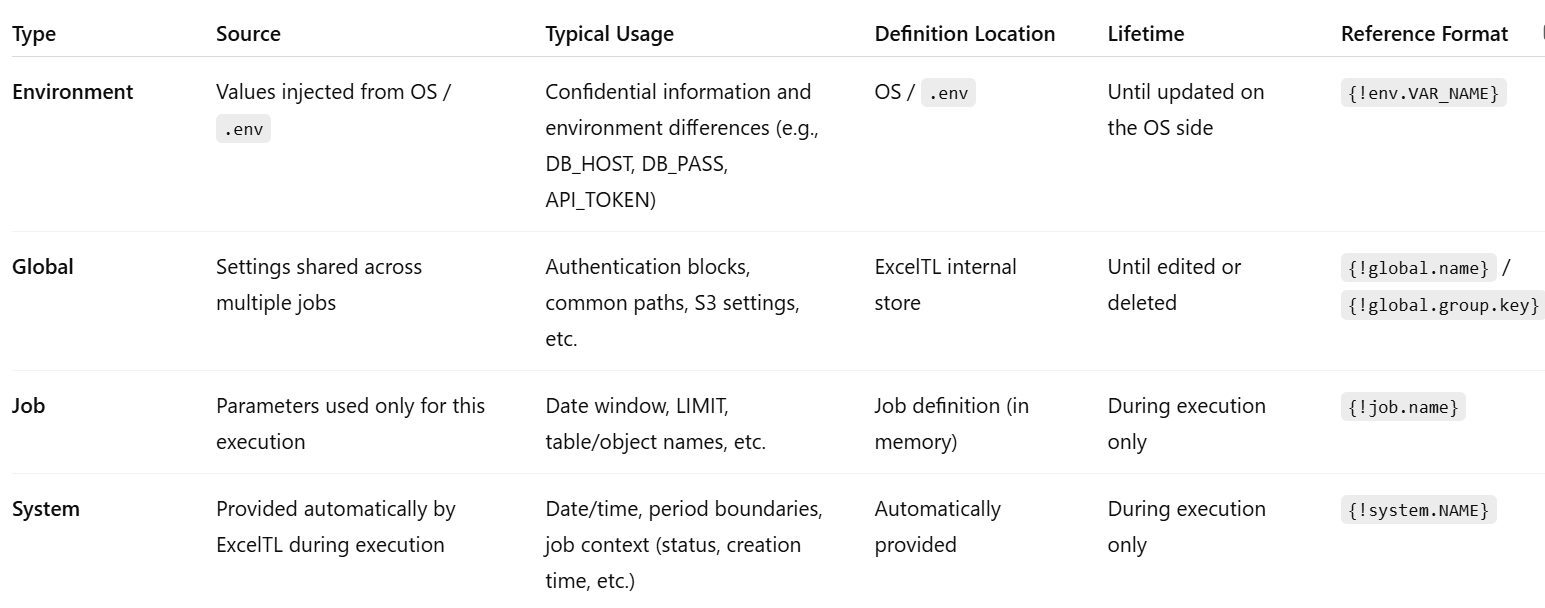
-
Job variables – Temporary adjustments for each execution
-
Global variables – Shared configurations (grouped attributes)
-
Environment variables – For secrets and environment-specific differences
-
System variables – Timestamps and contextual information.
3. Environment Variables (Secrets and Environment Differences)
-
Examples: {!env.DB_HOST}, {!env.SF_PASSWORD}, {!env.S3_REGION}
-
Naming rule: UPPER_SNAKE_CASE (e.g., DB_HOST, SF_TOKEN)
-
Use Cases: Connection info, HTTP headers, file paths, S3 keys, SQL parameters, etc.
-
Key Point: Do not include these in job definitions. Manage them in the OS or .env file.
4. Global Variables (Shared Settings and Auth Blocks)
-
Definition: In the job definition, list set_variable steps and specify attributes as details.var_key and details.var_value under the same step_name to register them as grouped properties.
-
Reference:
-
Entire block: {!global.postgres_auth} (attributes expanded in ExcelTL)
-
Individual keys: {!global.postgres_auth.host}
-
-
Operation: Variables can be viewed and edited in the “Variable List” of ExcelTL Studio (New entries are reflected when the job is uploaded and executed. Edits or deletions are handled directly in the database.)
💡 Tip: If you want to align definitions between the file and database, delete the corresponding global variable in Studio, then re-upload and execute the job to regenerate it.
5. Job Variables (Execution-Time Parameters)
-
Definition Example (one variable per line):
step_name=batch_size / step=set_variable / variable_scope=job / details.var_value=5
-
Usage example (in SQL):
SELECT * FROM {!job.table_name} LIMIT {!job.batch_size}
→ expands to account / 5 at runtime.
-
Notes:
-
Strings and dates must be quoted (e.g., WHERE created_at >= '{!job.start_date}')
-
Numbers should not be quoted (e.g., LIMIT {!job.batch_size})
-
Spelling must be exact (batchsize ≠ batch_size)
-
6. System Variables (Time, Boundaries, and Context)
-
Time: {!system.TODAY}, {!system.NOW}, {!system.YESTERDAY}
-
Boundary: {!system.THIS_MONTH.start}, {!system.THIS_MONTH.end}
-
Context: {!system.JOB_STATUS}, {!system.JOB_CREATED_AT}, {!system.JOB_LAST_RUN_AT}
Usage example: SELECT * FROM sales_orders WHERE created_at BETWEEN '{!system.THIS_MONTH.start}' AND '{!system.THIS_MONTH.end}';
-
Timezone resolution order: ETL_TZ → TIMEZONE → TZ → OS → UTC (If you want to standardize, explicitly specify e.g., ETL_TZ=Asia/Tokyo.)
Part 2: Job Dependency — Connecting Smarter, Not Bigger
1. Objective
Instead of building one massive job, the goal is to split jobs logically and connect them conditionally to create a robust and maintainable pipeline.
-
Observability & Re-execution: Identify which step failed and re-run only that job.
-
Reusability: Shared extract jobs can be reused across different pipelines.
-
Flexibility: Combine serial and parallel structures with conditional branching.
2. Basic Vocabulary
-
Dependency: A rule that makes a primary job wait until its dependent job meets the completion condition.
-
Conditions:
-
AFTER_SUCCESS – run after the dependent job succeeds
-
AFTER_FINISH – run after completion (regardless of result)
-
AFTER_FAIL – run when the dependent job fails
-
WAIT_ALL – run when all dependencies are met
-
WAIT_ANY – run when any one dependency is met
-
-
Trigger Types: SCHEDULE / DEPENDENCY / MANUAL
3. Typical Design Patterns
-
Sequential (E→T→L):
-
extract: SCHEDULE (daily 02:00)
-
transform: AFTER_SUCCESS(extract)
-
load: AFTER_SUCCESS(transform)
-
-
Parallel → Aggregation:
-
Run extract_A and extract_B in parallel
-
unify starts with WAIT_ALL + AFTER_SUCCESS(extract_A, extract_B)
-
-
Failure Handler:
-
Use AFTER_FAIL(target_job) to trigger notification or retry jobs.
-
Depending on business needs, AFTER_FINISH can be used for idempotent cleanup.
-
4. Design Principles
-
Keep jobs small and separate by I/O boundary and responsibility.
-
Reuse common jobs as shared assets.
-
Use WAIT_ALL + AFTER_SUCCESS as the standard aggregation pattern.
-
Control notifications with AFTER_FAIL.
-
Combine with Variables — use Job variables to switch date ranges or output paths.
Part 3: Combining Variables × Dependency (Practical Example)
Daily Pipeline Example (designed for partial re-execution):
-
job_extract (SCHEDULE 01:00)
SQL date window: BETWEEN '{!system.YESTERDAY:datetime}' AND '{!system.END_OF_DAY}'
-
job_transform (AFTER_SUCCESS(job_extract))
Reference table name: {!job.table_name}
-
job_load (AFTER_SUCCESS(job_transform))
Authentication: {!global.postgres_auth} (environment differences injected via {!env.*})
-
job_notify (AFTER_FAIL(job_extract | job_transform | job_load))
Checkpoints:
-
Store secrets and environment differences in Environment variables.
-
Group shared connection settings in Global variables.
-
Manage temporary values with Job variables.
-
Use System variables for time and boundary conditions.
-
Follow SQL quoting rules (strings/dates = quoted, numbers = unquoted).
-
Clearly define dependency conditions (SUCCESS / FINISH / FAIL × ALL / ANY).
-
Configure notifications and post-processing with AFTER_FAIL or AFTER_FINISH.
Summary
Variables enhance configuration reusability and security, while Job Dependency enables robust and flexible execution control. By properly designing the roles of Environment, Global, Job, and System variables together with dependency conditions like WAIT_ALL, WAIT_ANY, and AFTER, ExcelTL achieves a pipeline architecture that is small in design yet strong in connection.
Related Articles